
Key Takeaways
- Only 28% of organizations have a formal AI policy, yet 78% of employees already use unapproved AI tools at work (ISACA 2025, WalkMe 2025)
- Shadow AI breaches carry a $670K cost premium, and 65% expose customer PII (IBM 2025)
- Overly restrictive AI policies backfire: 60% of employees find ways around them (Kong 2025). An effective AUP enables safe AI use rather than banning it
- Cyber liability carriers are paying attention: many now require documented AI governance for coverage or favorable premiums. A signed AUP with tool tiers and incident reporting is the document your underwriter will ask for
- A mid-market AUP needs seven sections: scope, data classification, approved tools, acceptable uses, incident reporting, employee acknowledgment, and review schedule
- The policy is step one, not the destination. Once it's in place, the real work begins: prioritizing AI initiatives, evaluating build-vs-buy decisions, and building prototypes against your governance framework from day one
Why Your Company Needs an AI Policy Now
Here's a number that should concern you: according to ISACA's 2025 AI Pulse Poll, only 28% of organizations have a comprehensive AI policy. Meanwhile, WalkMe's 2025 survey found that 78% of employees are already using AI tools their employer didn't provide.
That gap isn't theoretical. I've seen it from the inside. At a large enterprise, employees across every department were using personal ChatGPT and Claude accounts, not just for drafting emails, but for researching proprietary tooling decisions, analyzing competitive data, and summarizing internal reports. No one had asked whether those free-tier accounts trained on the data entered. No one had checked.
Most employees don't grasp why this matters. They're used to web searches, where you retrieve information without giving anything away. LLMs work differently. When you type a prompt containing customer names, deal terms, or internal financials into a free-tier AI tool with model training enabled, that data becomes part of the model's training set. It doesn't disappear when you close the tab. Unlike a Google search, you aren't just pulling information out; you're putting information in, permanently. That's the core risk most employees don't understand, and it's why proper usage policies aren't optional.
Mid-market companies face the same exposure at a smaller scale, but with less infrastructure to detect it. Reco.ai's 2025 State of Shadow AI Report found that mid-sized organizations average 200 shadow AI tools per 1,000 users. And when those tools lead to a breach, the cost is steep: IBM's 2025 Cost of a Data Breach Report puts shadow AI breach costs at $4.63M, which is $670K above the baseline, with 65% involving customer PII.
The instinct is to reach for a template from SHRM, ISACA, or a Big Four firm. But those templates assume you have a compliance team, a legal department, and 10,000+ employees. They're 30 to 50 pages of enterprise policy language that no one at a 200-person company will read, let alone enforce. And that lack of governance is one of the most common reasons AI initiatives fail at mid-market companies.
What you actually need is five to seven pages of clear, enforceable language that an operations leader can customize, a department head can understand, and legal can review in an hour. That's what this template delivers.
If you're the CEO or COO reading this, forward it to whoever owns IT or operations with a 30-day deadline. The framework below covers everything they need. And if your company has fewer than 100 employees, don't skip this. Reco.ai's data shows smaller firms actually average more shadow AI tools per employee than mid-market companies. Size doesn't reduce the risk; it just reduces your ability to detect it.

The Seven Sections Every AI Acceptable Use Policy Needs
An effective AUP isn't a blanket ban or a vague encouragement to "use AI responsibly." It's a structural framework that answers seven specific questions your employees are already asking, whether or not they're asking them out loud.
This section walks you through what each section needs, why it matters, and the decisions you'll make while customizing it. The downloadable PDF at the end of this section is the actual fill-in-the-blank document: ready-to-customize language with brackets where your company-specific details go.
If you're looking for the broader governance program that wraps around this policy, including vendor evaluation, risk management, and strategic AI planning, I've covered that separately in the AI governance framework guide. This article focuses on the single most important document in that program: the acceptable use policy itself.

Section 1: Purpose and Scope
Define what this policy covers and who it applies to. Keep it to two paragraphs. The biggest mistake here is being too narrow (covering only "generative AI tools" and missing automation, copilots, and embedded AI features) or too broad (creating a policy that sounds like it governs all software).
Your scope should cover: any tool, feature, or service that uses artificial intelligence or machine learning to generate, analyze, summarize, or transform information. That includes standalone AI applications, AI features embedded in existing tools (like Copilot in Microsoft 365), and any API-based AI integrations.
Section 2: Data Classification for AI Use
Before anyone touches an AI tool, they need to know which data can go into it and which can't. A three-tier classification works for most mid-market companies:
- Tier 1 (Unrestricted): Publicly available information, marketing content, general industry data
- Tier 2 (Internal): Internal processes, anonymized metrics, non-sensitive operational data
- Tier 3 (Restricted): Customer PII, financial records, employee data, trade secrets, any regulated data (HIPAA, SOX, GLBA)
Tier 3 data never enters an AI tool without explicit approval from IT leadership and verification that the tool meets your data handling requirements. For a deeper look at how data classification connects to vendor selection and retention policies, see the AI data privacy guide.
Section 3: Approved AI Tools and Access Tiers
This is where most policies either go too far (banning everything) or not far enough (approving "ChatGPT" without specifying which tier).
Here's my position, and it's a strong one: no free-tier LLM should be on any company's approved list. Every major AI provider's free tier uses your data for model training by default. That means every prompt your employees enter, including the ones with client names, internal metrics, and competitive analysis, becomes training data.
The minimum acceptable starting point is the next paid tier up, where training on your inputs is disabled by default. For most mid-market companies, that means funding paid accounts: ChatGPT Team or Enterprise, Claude Pro or Team, Gemini Business. The specific tier depends on your data sensitivity and regulatory environment, but the free tier is never the answer.
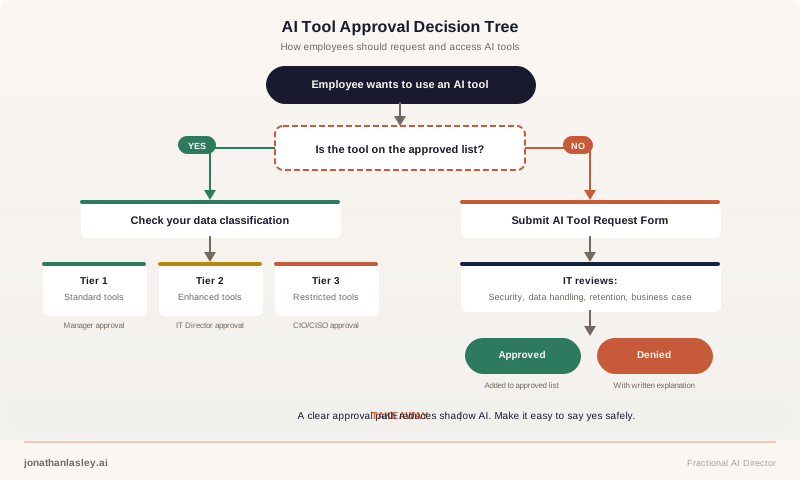
Structure your approved tool list in tiers that match your data classification:
| Tool Tier | Data Allowed | Example Tools | Approval Required |
|---|---|---|---|
| Standard | Tier 1 only | ChatGPT Team, Claude Pro | Department manager |
| Enhanced | Tier 1 and 2 | ChatGPT Enterprise, Claude Team with SSO | IT Director |
| Restricted | Tier 1, 2, and 3 (with controls) | On-premise models, API-only with DLP | CIO/CISO + compliance review |
What does that cost? At $20 to $30 per user per month for tools like ChatGPT Team or Claude Pro, a 200-person company is looking at $4,000 to $6,000 monthly. Compare that to a single shadow AI breach at $4.63M. The math isn't close, and your CFO will see it the same way when the numbers are side by side. There's also an insurance angle: many cyber liability carriers now require documented AI governance as a condition of coverage or favorable premiums. When your underwriter asks what controls you have around AI, a signed AUP with tool tiers and incident reporting is the document they're looking for.
Include a process for employees to request new tools. The request should cover: what the tool does, what data it will process, the vendor's data handling and retention policies, and the business justification. Without a clear request process, employees skip the policy entirely and go straight to their personal accounts.
Section 4: Acceptable and Prohibited Uses
Spell out what employees can and can't do with approved AI tools. Avoid legalistic language. Write it so a department head can explain it in a team meeting.
Acceptable uses (with approved tools and appropriate data tiers):
- Drafting and editing internal communications
- Summarizing meeting notes and research
- Generating first drafts of reports, proposals, and presentations
- Analyzing anonymized operational data
- Code assistance and debugging (with code review requirements)
Prohibited uses (regardless of tool or tier):
- Entering customer PII, financial data, or trade secrets into any AI tool not approved for that data tier
- Using AI output in regulatory filings, legal documents, or financial reports without human review and sign-off
- Using AI tools for employment decisions (hiring, performance reviews, termination) without documented human oversight and compliance review
- Representing AI-generated work as original human work to clients or external stakeholders without disclosure
- Using personal AI accounts for any work-related task
That last point matters more than most companies realize. Personal accounts are the single largest shadow AI vector. If your policy doesn't explicitly prohibit them for work tasks and provide a funded alternative, you've written a policy that the vast majority of your workforce will ignore.
Section 5: Incident Reporting and Response
When something goes wrong, and eventually it will, employees need a clear, blame-free path to report it. If reporting an AI incident feels like admitting a fireable offense, people will cover it up instead of flagging it.
Define what constitutes a reportable incident. Concrete examples make the difference between a policy people follow and one they ignore:
- An employee realizes they pasted a customer list into a free-tier AI tool before reading the policy
- AI-generated output contains what appears to be someone else's proprietary data or code
- A colleague mentions using a personal ChatGPT account to summarize internal financial reports
- A vendor's AI feature starts processing data it wasn't previously configured to access
Establish a reporting channel (a dedicated email alias, form, or chat channel), a 24-hour reporting window, and a tiered response protocol:
| Severity | Example | Response Timeline | Escalation |
|---|---|---|---|
| Low | Tier 1 data entered into an unapproved but paid tool | 48 hours | Policy owner reviews, retrains employee |
| Medium | Tier 2 data entered into a free-tier tool | 24 hours | IT Director assesses data exposure, contacts vendor |
| High | Tier 3 data (PII, financials, trade secrets) in any unapproved tool | Immediate | CIO/CISO activates incident response, legal review |
The first incident someone reports sets the tone for every future report. If you respond with blame, you won't hear about the next one.
Section 6: Employee Acknowledgment
Every employee signs an acknowledgment confirming they've read, understood, and agree to follow the policy. Skip this step and you have no documented baseline when an incident triggers a compliance investigation or legal action. The acknowledgment creates that paper trail.
The acknowledgment should affirm four things: the employee has read the current version of the policy, they understand which data tiers apply to their role, they know how to submit a tool request and an incident report, and they agree to use only approved tools for work-related tasks. Keep it to one page with a signature line and date.
Include the acknowledgment as part of onboarding for new hires and require annual re-acknowledgment for existing employees. Store signed copies centrally; you'll need them if an incident triggers a compliance review.
Section 7: Policy Review and Update Schedule
AI moves fast. A policy written in February can be outdated by June. Build in a quarterly review cadence with specific trigger events that prompt an immediate review:
- A new AI tool is requested or adopted
- A regulatory change affects your industry (and they're coming: Colorado's SB 24-205 takes effect June 2026, Illinois HB 3773 and Texas RAIGA took effect January 2026, and California's CCPA ADMT rules require employer compliance by January 2027)
- An AI-related incident occurs internally or at a peer company
- A major vendor changes its data handling, pricing, or retention policies
Assign a named policy owner (not a committee) and document every review, even if no changes are made.
Ready for the actual fill-in-the-blank document? The sections above explain what each part of your AUP needs and why. The downloadable PDF below is the template itself: all seven sections in ready-to-customize language with [Company Name] brackets where your details go, plus four worksheets you'll use during rollout:
- AI Tool Approval Intake Form: The request form employees submit when they find a new AI tool, with fields for data classification, vendor retention policies, and business justification
- Data Classification Quick-Reference Card: A one-page card to post in every department showing Tier 1/2/3 with examples specific to common roles
- Incident Reporting Form: A pre-built form that captures what happened, what data was involved, and when, so your response team can act immediately
- Quarterly Review Checklist: A structured checklist with a sign-off field for the policy owner, covering each section plus regulatory and vendor trigger events
It scales from 50-person teams to 500-employee organizations and is designed to be completed in an afternoon.
Download the Complete AUP Template Kit
The full 7-section policy template with fill-in-the-blank language, plus four worksheets: AI Tool Approval Intake Form, Data Classification Quick-Reference Card, Incident Reporting Form, and Quarterly Review Checklist. Scales from 50-person teams to 500-employee organizations. Designed to be completed in an afternoon.
Rolling Out Your AUP Without Killing Productivity
You can write this policy in an afternoon. Getting 200 people to actually follow it takes more thought.
According to Kong Inc.'s 2025 Workplace AI Report, 60% of employees find ways around their employer's AI usage rules. And WalkMe's survey found that only 7.5% of employees have received extensive AI training, while 23% have received none at all.
The announce-and-punish approach, sending an email that says "here's the new AI policy, violations will result in disciplinary action," is the fastest way to ensure your policy exists on paper and nowhere else.
Frame it differently. The message to employees should be: "We're investing in AI tools for you and putting guardrails in place so you can use them confidently." Position the AUP as the company removing barriers and providing access, not adding restrictions. When employees hear "new policy," they hear "new rules." When they hear "we bought you better tools and here's how to use them safely," they hear investment. That framing difference determines whether your adoption rate lands at 80% or 30%.
A Phased Enablement Approach
Week 1-2: Soft launch with champions. Identify 5-10 employees across departments who are already using AI tools productively. Share the draft policy with them, get their feedback, and make them your rollout advocates. They'll tell you which rules are unclear, which tool tiers don't match their actual workflows, and which sections feel punitive rather than enabling.
Week 3: Department-level rollouts with training. Don't just distribute the policy. Walk each department through it with examples specific to their work. Sales teams need different use-case examples than finance teams. Include a 30-minute hands-on session with the approved tools so employees experience the policy as access, not restriction.
A half-day AI training workshop compresses weeks of self-guided learning into one session and gives every team member hands-on experience with the approved tools before the policy takes effect. That single investment pays for itself in compliance rates alone.
Week 4: Company-wide acknowledgment and monitoring. Roll out the full policy, collect signed acknowledgments, and begin lightweight monitoring through tool usage logs, not surveillance. Share early wins publicly: "The marketing team saved 12 hours this week using approved AI tools for content drafts." By the end of Week 4, you should see 70-80% of AI usage flowing through approved tools. If you're below 50%, the problem is access (tools aren't easy enough to use) or awareness (people don't know the approved options exist), not willful noncompliance.
The goal is for employees to see the AUP as the thing that gave them access to better tools, not the thing that took away the tools they were already using.
Keeping Your Policy Alive
The worst thing that can happen to an AI acceptable use policy isn't a violation. It's irrelevance. And irrelevance is coming faster than most companies expect.
Today's AUPs govern employees prompting AI tools. But agentic AI systems are already changing that equation. Within the next year, many companies will deploy AI agents that take autonomous actions: scheduling meetings, retrieving data from internal systems, following up with customers, even making purchasing decisions within set parameters. Your AUP needs room to grow into governing what AI does on its own, not just what employees ask it to do. The companies that build that flexibility into version one won't need a full rewrite when agentic deployments arrive.
Three other forces are working against your policy on a shorter timeline: AI capabilities shift quarterly, vendor data handling policies change without notice, and state legislatures are moving fast. According to the Future of Privacy Forum, 145 AI bills were enacted across 38 states in 2025. California's FEHA AI regulations, Illinois HB 3773, and Colorado's SB 24-205 all target AI use in employment decisions, and your AUP's quarterly review cadence is the mechanism that keeps you ahead of these changes rather than behind them.
Build three maintenance habits:
- Quarterly review: Schedule a 60-minute review with the policy owner, IT lead, and one business unit representative. Walk through each section and ask: "Has anything changed that makes this language outdated or incomplete?"
- Trigger-based updates: Don't wait for the quarterly review if a new regulation passes, a vendor changes its terms, or an incident occurs. Update the policy within two weeks of the trigger event.
- Annual re-acknowledgment: Every employee re-signs the policy annually. The re-acknowledgment doubles as a forcing function: at least one touchpoint per year where employees actually re-read the current version.
If your industry involves HIPAA, SOX, GLBA, or FCRA regulated data, your AUP needs explicit rules about AI tools processing that data. These regulations don't have AI-specific carve-outs, but they apply the moment an AI tool touches regulated information.
When Your AUP Is the Starting Line
An AI acceptable use policy is the most important single document in your AI governance program. But it's one document, not the entire program.
Once your AUP is in place and enforced, the next questions start surfacing: Which AI initiatives should we prioritize? How do we evaluate build-vs-buy decisions? Who owns AI strategy at the leadership level? Those questions sit at the center of a comprehensive AI strategy for mid-market companies.
That's where a Fractional AI Director adds the most value. Here's what the timeline typically looks like after the AUP is in place:
- Month 1: Policy is live, approved tools are deployed, and you're collecting data on how teams actually use AI
- Month 2: Use that data to identify the three to five highest-ROI AI opportunities specific to your operations
- Month 3: A working prototype of the top-priority use case is in testing, built against your governance framework from day one
The AUP is the first deliverable in that engagement because it establishes the baseline for everything that follows. Without it, every AI initiative starts with a governance argument instead of a business case. And the longer that argument runs, the longer your competitors are capturing the efficiency gains, cost reductions, and revenue opportunities that governed AI adoption unlocks.
If you're not ready for that step, start with the policy. Get it signed, get it rolled out, get your team using approved tools productively. That alone puts you ahead of the 72% of companies operating without one.
Frequently Asked Questions
What's the difference between an AI acceptable use policy and an AI governance framework?
An AI acceptable use policy is a single document that tells employees what they can and can't do with AI tools. It covers approved tools, data handling rules, and incident reporting. An AI governance framework is the broader program: vendor evaluation, risk management, strategic planning, and ongoing oversight. The AUP fits inside the governance framework as one of its most critical components. Most mid-market companies should start with the AUP and expand to a full governance program as their AI maturity grows.
How often should a company update its AI acceptable use policy?
At minimum, quarterly. But don't limit updates to a fixed schedule. Any of these should trigger an immediate review: a new AI tool request that doesn't fit existing categories, a regulatory change in your operating states, a vendor changing its data handling or pricing policies, or an AI-related security incident. Assign a single policy owner who's accountable for keeping it current.
Do companies with fewer than 100 employees need a formal AI policy?
Yes. Company size doesn't reduce the risk. Reco.ai's data shows organizations with 11 to 50 employees average 269 shadow AI tools per 1,000 users, actually higher than mid-market averages. If seven sections feels like too much infrastructure for a 15-person firm, start with three: Data Classification (Section 2), Approved Tools (Section 3), and Incident Reporting (Section 5). Those three cover the highest-risk areas and can fit on two pages. Add the remaining sections as your team grows. The AI readiness assessment checklist can help you identify which governance gaps to close first.
What happens if an employee violates the AI acceptable use policy?
The policy should define a graduated response: first violation triggers a documented conversation and retraining, repeat violations trigger formal disciplinary action. The critical design principle is making reporting blame-free. If employees fear immediate termination for an honest mistake, they'll hide incidents instead of reporting them, which is worse for the company than the original violation. The goal is containment and correction, not punishment.
Can we just ban AI tools instead of creating a policy?
You can try, but the data suggests it won't work. Kong's 2025 research found that 60% of employees find ways around restrictive AI policies. Banning AI doesn't eliminate AI use; it eliminates your visibility into AI use. The result is more shadow AI, more uncontrolled data exposure, and zero ability to track what's happening. A well-designed AUP achieves the opposite: it channels AI usage through approved, monitored tools while giving employees the access they need. The phased enablement approach in this article's rollout section is specifically designed to make the transition feel like access rather than restriction. If you need help designing that kind of enabling policy, AI consulting services focused on governance can get you there faster.
Ready to Put Your AI Policy in Place?
The gap between "we should have an AI policy" and "we have an AI policy" is smaller than most companies think. Start with this template, customize it for your industry and data sensitivity, and get it rolled out.
Take the free AI readiness assessment to see where your company stands across all dimensions of AI maturity, including governance, or book a free 30-minute strategy call to discuss your specific situation.
